💸 Withdrawals
Getting money out of Polyfox — the /withdraw flow with preview and confirmation, on-chain proof, and the key-export exit that doesn't depend on the bot.
You can get your money out two independent ways. The normal way is the bot's withdrawal flow: preview, confirm, receive on Polygon, get the transaction link. The fallback needs no one's permission: export your private key and use the funds from any wallet.
In 10 seconds
- Start with
/withdrawor 💳 Wallet → 💸 Withdraw; withdrawals settle on Polygon. - You see a full preview (recipient, amount, destination) before anything moves; Polyfox adds no withdrawal fee of its own, though the bridge's provider fees may reduce the received amount.
- Completion comes with a PolygonScan transaction link — public, independent proof.
- Fallback that needs no permission: export your private key and use the funds from any wallet.
Withdrawing through the bot
Start with /withdraw or 💳 Wallet → 💸 Withdraw.
- Choose the asset. You only see options the provider currently confirms as live.
- Enter the destination address. Withdrawals settle on Polygon. Sending back to your exchange? First check, in the exchange, that it accepts deposits of that exact asset on the Polygon network, and use the deposit address it shows for Polygon — an exchange deposit in an asset or network it doesn't support can be lost. If your exchange doesn't support it, withdraw to a self-custody wallet you control (e.g. MetaMask) instead.
- Choose the amount. Presets 25% / 50% / Max, or type a custom amount. Each destination has a minimum; the bot tells you if you're under it or over your balance.
- Review the preview. You see recipient, amount and destination before anything moves. Polymarket's own bridge converts your pUSD balance into the asset you picked (e.g. USDC on Polygon) — that asset, not pUSD, is what arrives at the address. (Withdrawing as pUSD itself is a direct transfer with no conversion step.) Polyfox adds no withdrawal fee of its own and gas is covered; the bridge's provider fees may reduce the received amount, and the preview says so.
- Confirm. Nothing is sent until this tap. Cancel at any point and nothing moves — the bot confirms "Nothing was sent."
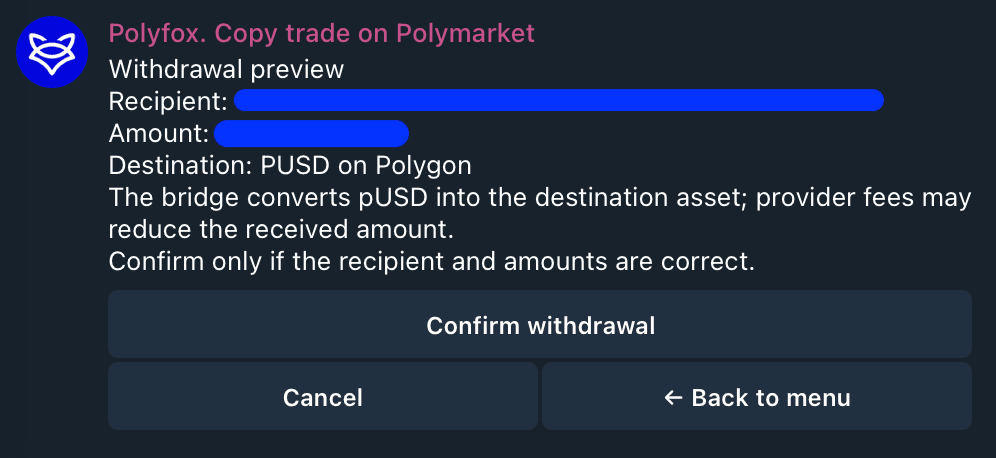
What to expect after you confirm
- The bot reports the withdrawal as submitted, with a provider reference.
- When it completes on-chain you get a ✅ Withdrawal completed notification with the amount, recipient and a PolygonScan transaction link — public proof the money arrived.
- If it fails, you get a failure notification with the reason, and the bot tells you to check your balance before retrying. A failed withdrawal is never silently swallowed.
Protections around withdrawals
- If you set a funds password, every withdrawal requires it (as do key export and wallet deletion). See Security.
- Confirmations are replay-safe: tapping an old confirm button cannot trigger a second withdrawal.
The exit that doesn't need the bot
You can export your wallet's private key at any time (Wallet → Export Keys). Import it into MetaMask or any Polygon-compatible wallet and you control the same funds and positions directly on-chain, whether or not the bot exists. That is the answer to "what if the bot disappears?" — do the export early, while everything works, and your access never depends on the bot.
Next steps
Last updated on