🧠 Smart Wallets
How the 50–100 Smart Wallet Score is computed from historical trades, what it measures, and why it is not a recommendation.
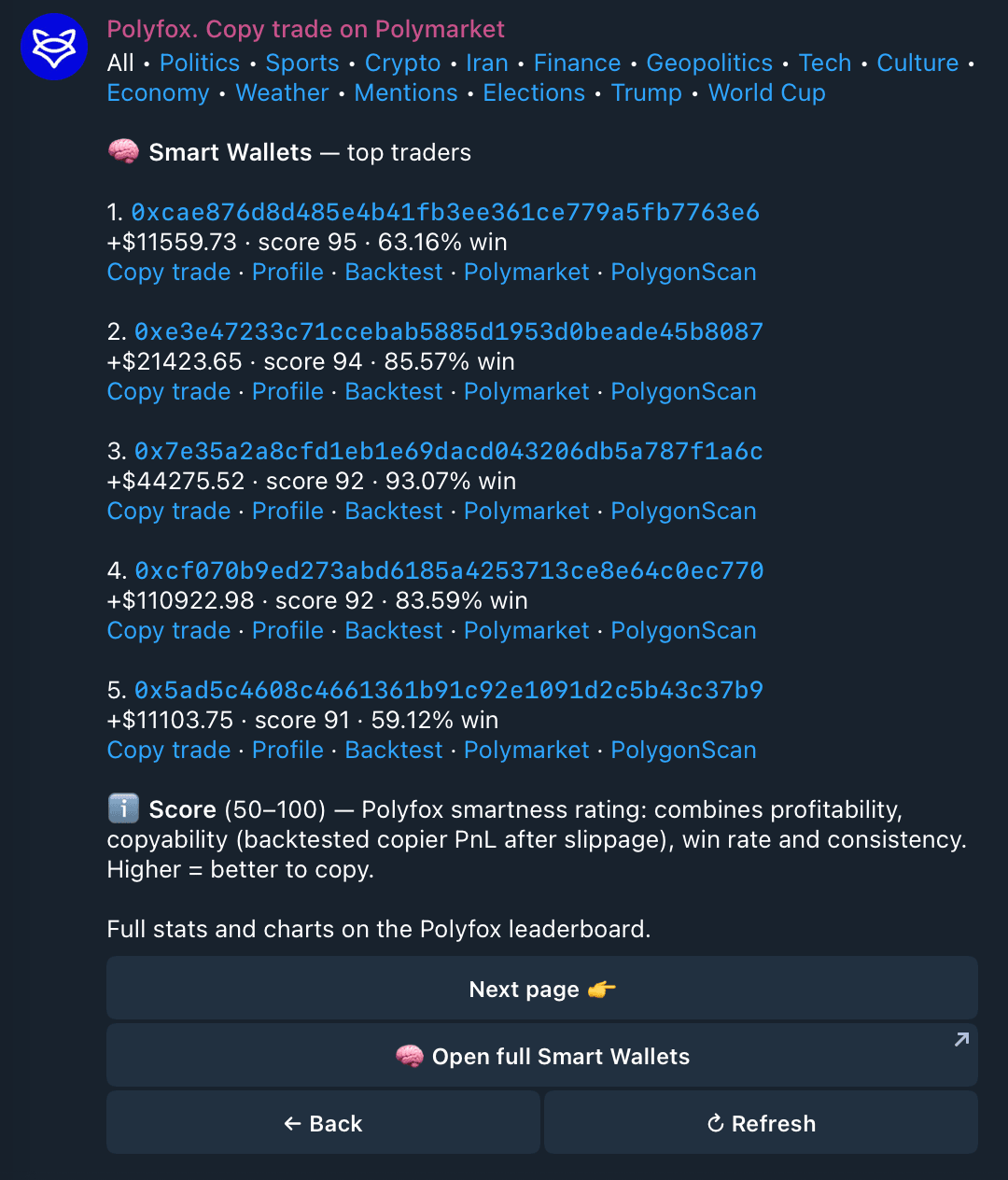
Smart Wallets is a ranked list of Polymarket wallets with strong historical trading records. Each wallet carries a Score — a summary number computed from its past, on-chain trades. Use it to shortlist wallets worth a closer look, then check the record yourself; the Score is not a recommendation to copy anyone.
In 10 seconds
- The Score is a 50–100 rating computed from a wallet's historical trades; wallets estimated below 50 are simply not listed.
- It combines profitability, backtested copyability after slippage, win rate and consistency.
- It is not a recommendation and not a prediction — high-Score wallets can and do lose money.
- You can backtest any wallet with your own settings before copying.
What the list shows
Open 🧠 Smart Wallets to see the ranked list. For each wallet you see its historical PnL, Score and win rate, with links to its Polymarket profile, its PolygonScan history and a Polyfox profile page with fuller stats. (For the broader practice — finding and reading these wallets by hand — see How to track Polymarket smart money.)
How the Score works
The Score is a rating on a 50–100 scale, computed from each wallet's historical trades. 50 is the display floor: wallets whose estimate falls below 50 are simply not listed. Read the scale accordingly — every wallet you can see scores 50+, so a 55 sits near the bottom of the list, not "above average". The model combines parameters such as:
- profitability — realized results of past trades (PnL, ROI);
- copyability — backtested results of a simulated copier following the wallet, after slippage, including how often such a copier would have lost;
- win rate — the share of past trades that resolved profitably;
- consistency and recency — how stable results were over time and in the most recent trades, plus breadth signals like markets traded, trading days and volume.
A higher Score means the wallet's past record ranks better on these parameters — nothing more.
Not a recommendation
The Score describes historical trades. It is not a recommendation to copy any wallet and not a prediction of future results. Wallets with high historical Scores can and do lose money going forward. Every performance figure on the list is historical data, not a forecast.
Check a wallet yourself before copying
Everything the Score summarizes is public, and you can verify it:
- On-chain history — the PolygonScan link shows every past transaction.
- Polymarket profile — the wallet's positions and activity on Polymarket itself.
- Backtest — Polyfox can simulate copying this wallet with your settings (size, slippage, limits) over its past trades, so you see what your configuration would have done. Two limits to keep in mind: a backtest cannot know how your own orders would have moved prices at the time, and listed wallets were selected because their past record is strong — so a good backtest over that same record is partly baked in. It is historical data, not a forecast.
From list to copy
- Open 🧠 Smart Wallets and pick a wallet — review its stats, PolygonScan history and Polymarket profile.
- Tap Copy trade and set your size and limits.
- Fund the copy — nothing is spent until the trader actually trades.
The mechanics, the $1 minimum and the skip rules are on the Copy trading page. You can also just browse the list — looking costs nothing.
Next steps
Last updated on