🚀 Copy trading
How Polyfox mirrors another wallet's trades — sizing modes, the $1 minimum, skip rules, copy-sell scope, pauses and safety limits.
When you copy a wallet, the bot mirrors that wallet's trades with your money, at a size you choose. Each time the trader you copy places a trade, the bot places a matching order from your balance, sized by your rules — per-trade minimum and maximum, price bands, take-profit/stop-loss, a balance stop — and sends you a notification. It can never spend more than your balance, and you can stop with one tap.
In 10 seconds
- Sizing: a percentage of the target's trade or a fixed dollar amount; platform minimum $1 per copied trade.
- Copies below your Min Per Trade are skipped, not bumped up; below the $1 floor the default is to buy at exactly $1 (you can turn that off).
- Want full isolation? Run the copy from a sub-wallet — copy-sell then can never touch your other positions.
- Every copy sends a notification; pause or delete at any time.
Setting up a copy
- Open 🚀 Copy Trade → ➕ Create Copy Trade.
- Paste a trader's wallet address — or pick one from Smart Wallets.
- Choose your sizing and, if you want, tune the filters below.
- Fund it. Nothing is copied until the copy is funded, and nothing is spent at setup.
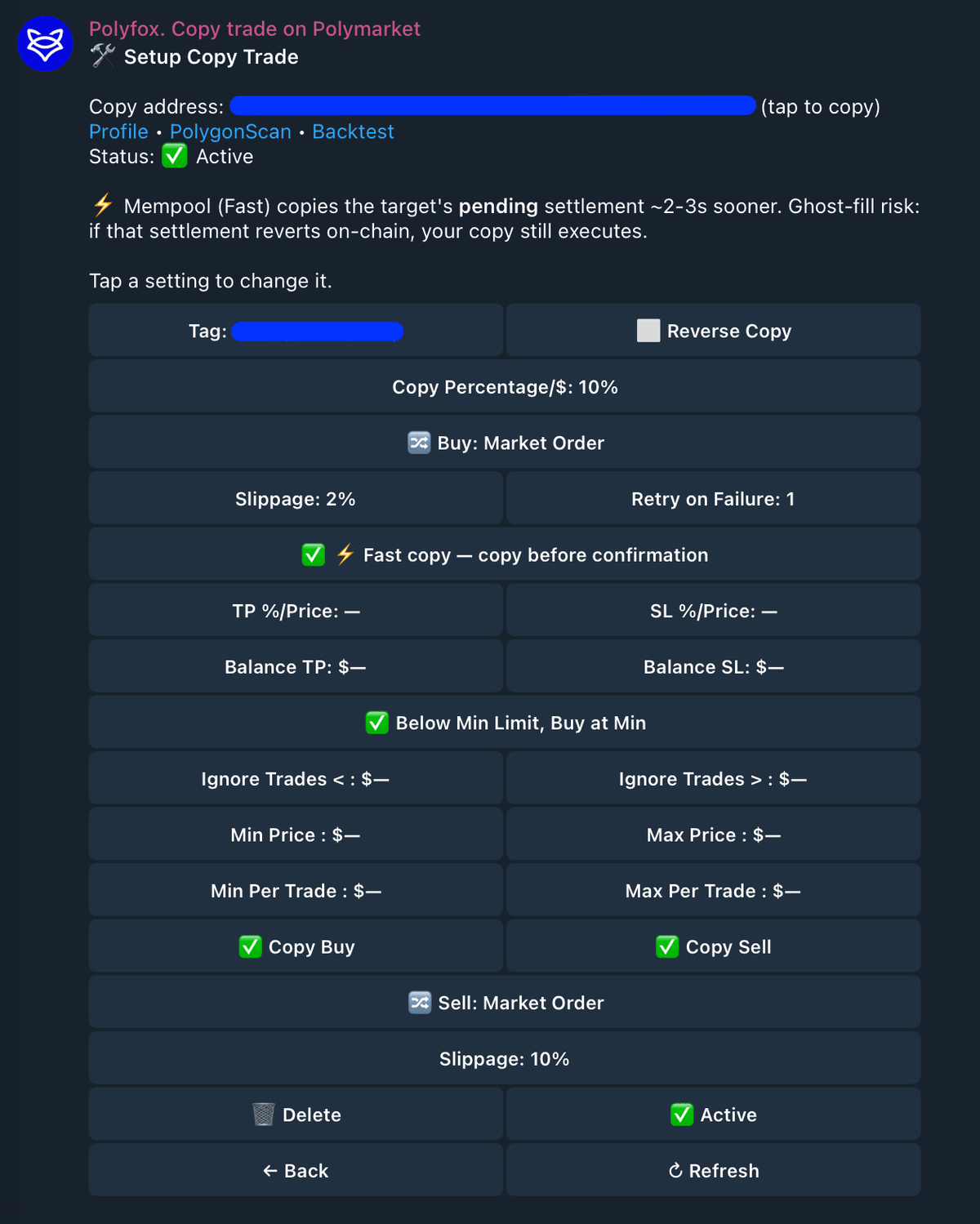
How copies are sized
Two sizing modes, set per copy:
- Percentage — e.g.
10%: each of the target's trades is copied at 10% of their size. - Fixed dollars — e.g.
$25: every copied buy spends the same fixed amount.
The platform minimum per copied trade is $1.
Two minimums apply, and they behave differently:
- Your Min Per Trade setting: skipped, never raised. If a sized copy comes out below the minimum you set, the bot skips that trade. It never quietly rounds it up — your money is not spent on trades smaller than you asked for.
- The $1 platform floor: bought at $1 by default. A copy that sizes below $1 is raised to exactly $1 by the "Below Min Limit, Buy at Min" setting, which is on by default. Turn it off if you'd rather have sub-$1 copies skipped too.
This is also why a small balance copies less closely: at 10% sizing, a $6 target trade sizes to $0.60 — which either becomes an oversized $1 buy (the default) or a skip (with the toggle off or a Min Per Trade set). Either way the copy tracks the target's proportions poorly. That is the whole reason the bot suggests $100+ for copy trading — it is a sizing tip, not a fee or a requirement.
Copied trades are trades like any other: Polyfox's flat 1% trading fee applies.
What copy-sell does (and does not) touch
Copy-sell mirrors the fraction the target sold, from the wallet your copy runs in. If the trader sells 40% of their shares in a market, your copy sells 40% of its wallet's shares of that same outcome — never more than it holds, and never anything in other markets.
The wallet is the boundary, so where the copy runs matters:
- Sub-wallet copy (see Sub-wallets): the copy trades inside its own wallet, so a copy-sell can only ever touch what that copy bought. Your manual positions and other copies are physically out of reach.
- Main-wallet copy: the sell fraction applies to your main wallet's whole holding of that outcome. If you also bought the same outcome manually — or through another main-wallet copy — those shares are pooled with the copy's, and a copy-sell sells the fraction from the combined position.
If you plan to trade the same markets you copy, run the copy from a sub-wallet.
Execution controls
- Copy Buy / Copy Sell independently enable mirroring the target's buys and sells. Turning one off does not affect the other.
- Reverse Copy keeps the target's buy or sell direction but trades the opposite outcome. For example, a target buy of YES becomes your buy of NO.
- Fast Copy lets the bot act on a pre-confirmation observation. It can improve latency, but carries the ghost-fill risk described below.
- Retry on Failure adds
0–3retries for a failed copied market buy. It is not used for limit buys. - Buy / Sell order type are independent. Market sides use slippage; limit sides use their own offset and expiration.
Copying buys or sells can be disabled without pausing the subscription. Pause is broader: it stops all mirroring until resumed.
Risk controls
- Take Profit / Stop Loss auto-sell a copied position at a gain/loss percentage or an absolute price. They apply when copied sells use market orders; limit-sell mode uses its own limit controls instead.
- Balance Take Profit / Balance Stop Loss are periodic circuit breakers. When the wallet balance reaches the configured upper threshold or falls to the lower threshold, the subscription is paused. These checks do not close positions.
- Below Min Limit, Buy at Min controls only the platform's $1 floor: when enabled, an otherwise valid copy below $1 is raised to exactly $1. It does not override your configured Min Per Trade.
Balance guards are not real-time exit orders. Review or sell existing positions separately after a guard pauses the subscription.
Trade filters and sized-copy limits
These controls apply at different stages:
- Ignore Trades Under / Above inspect the target's original trade amount. A target trade outside that band is not copied.
- Min / Max Price inspect the target trade price. Trades outside the configured
0.001–0.999band are not copied. - Min Per Trade checks your resulting copy after percentage/fixed sizing. A copy below this threshold is skipped.
- Max Per Trade caps your resulting copy after sizing.
The target-trade filters and sized-copy limits are deliberately separate. For example, a large target trade can pass the target-size filter but produce a small percentage-sized copy that is then skipped by Min Per Trade.
Order controls
Each side can use a market or limit order independently:
- Market buy: Buy Slippage and Retry on Failure apply.
- Limit buy: Buy Limit Offset and Buy Expiration replace those market-buy controls.
- Market sell: Sell Slippage and Take Profit / Stop Loss apply.
- Limit sell: Sell Limit Offset and Sell Expiration replace those market-sell controls.
Offsets and expirations are configured separately for buys and sells. Expiration accepts 90s–7d, or no expiration for GTC. See Limit orders inside copy trading for details.
Fast copy (mempool mode)
New copies default to Fast copy: the bot may act on the target's pending transaction about 2–5 seconds before it confirms on-chain. The trade-off: if that pending transaction ends up reverting, your copy has still executed (ghost-fill risk). The bot states this trade-off in the copy's settings, where you can turn Fast copy off to act only on confirmed trades.
Pausing, running out of balance, deleting
- Pause / resume any copy from its Setup screen at any time. A paused copy mirrors nothing.
- Insufficient balance: if a copy cannot afford a trade, it skips it and notifies you with the exact shortfall. Balance-guard protection can automatically pause copying when your balance cannot support it.
- Delete: copying stops and the copy is removed. Your existing positions stay in your wallet — deleting a copy never sells anything by itself. To exit those positions, sell them whenever you choose from 🏦 Positions, like any other position.
Sub-wallets: an isolated budget
If you want, a copy can run from a sub-wallet — a separate wallet with its own budget, funded from your main wallet. Its balance and PnL stay separate, you can move funds between the two at any time, and you can export the sub-wallet's private key just like the main one. Deleting a sub-wallet copy returns its free balance to your main wallet and keeps the sub-wallet archived for 7 days, in case you want it back.
One current limitation: automatic redemption of resolved winning positions covers your main wallet, not sub-wallets. A position that resolves while held in a copy sub-wallet is not redeemed automatically — the sub-wallet's exportable private key always gives you direct on-chain access to it.
Every copy is reported
Each executed or failed copy sends you a notification with the market, direction, size, target price and your fill price — plus links to the market, the trader's profile and PolygonScan. Skipped copies are reported too.
Copying a wallet mirrors its future trades. Its past performance is historical data, not a forecast.
Next steps
Last updated on